V2 Architecture: Design, Hardware & Naming Conventions
Redesigning my homelab network, creating a hardware inventory, and defining IP/VLAN/CTID/VMID conventions.
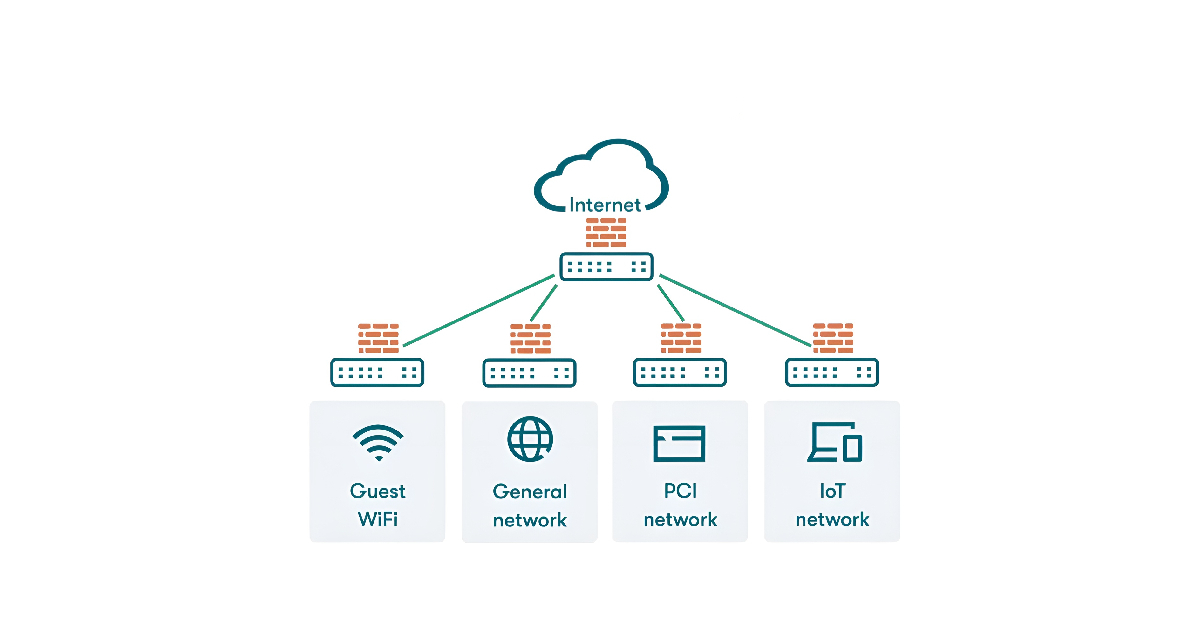
Why V2 Exists
V1 proved the concept; a working hypervisor, a DNS sinkhole, and a functional attacker-target lab. But the longer it ran, the more its limitations became apparent:
- No network segmentation: everything shared a flat
192.168.1.xsubnet with personal devices, smart TVs, and IoT appliances - No trust boundaries: a misbehaving IoT device could reach the lab server directly
- No centralized logging: attacks were executed against lab machines with zero detection capability
V2 was designed to address each of these gaps deliberately: segmented VLANs with enforced firewall policies, centralized SIEM with endpoint agents, and a multi-node architecture that separates workloads by function.
Hardware Inventory
I decided to become thorough with documentation in V2, and so inventoried the machines on my network.
Desktop Workstation : citadel
| Spec | Value |
|---|---|
| Type | Custom-built PC |
| CPU | Intel Core i7-10700K (8c/16t, 5.1 GHz boost) |
| RAM | 32 GB DDR4 @ 3000 MT/s |
| GPU | Gigabyte RTX 3070 Eagle OC (8 GB) |
| Storage | 1 TB NVMe (OS) + 2 TB NVMe (bulk) |
| OS | Windows 11 Home |
| VLAN | 10 — Trusted |
Primary workstation for development, lab access, and daily use. Resides on the Trusted VLAN, it can reach the lab network, but lab machines cannot reach back.
Virtualization Host : pavilion
| Spec | Value |
|---|---|
| Type | HP Pavilion 23 AiO (repurposed) |
| CPU | Intel Core i5-4590T (4c/4t) |
| RAM | 16 GB DDR3L |
| Storage | 1 TB SATA SSD |
| OS | Proxmox VE |
| VLAN | 20 — Lab |
The same machine from V1, reinstalled clean. Runs all core infrastructure and supporting services as LXC containers and/or VMs.
Mobile Workstation : annex
| Spec | Value |
|---|---|
| Type | MacBook Pro 13-inch (2020) |
| CPU | Intel Core i5-8257U (4c/8t) |
| RAM | 8 GB LPDDR3 |
| Storage | 256 GB NVMe (soldered) |
| OS | macOS Sequoia |
| VLAN | 10 — Trusted (5 GHz WiFi) |
Mobile workstation used for development, daily use, and remote lab access via SSH.
Docker Host : inspiron
| Spec | Value |
|---|---|
| Type | Dell Inspiron 3505 (repurposed laptop) |
| CPU | AMD Ryzen 5 3450U (4c/8t) |
| RAM | 12 GB DDR4 |
| Storage | 256 GB NVMe + 1 TB HDD |
| OS | Ubuntu Server 24.04 LTS |
| VLAN | 20 — Lab |
Dedicated Docker host running containerized services. A USB Gigabit adapter serves as the primary network interface, bypassing the built-in 100 Mbps limitation.
Design Conventions
Before deploying any services, a conventions document was written as a reference for IP assignments, container IDs, and VLAN policy. Doing this upfront investment helps set guidelines for any IP/ID deployed within my lab.
IP Address Schema
The same structure applies uniformly across every VLAN:
| Range | Category |
|---|---|
.1 | Gateway |
.2 — .9 | Network infrastructure (switches, APs) |
.10 — .19 | Physical nodes (servers, workstations) |
.20 — .59 | LXC containers |
.60 — .99 | Virtual machines |
.100 — .254 | DHCP pool |
Examples:
192.168.10.11= physical node on the Trusted VLAN.192.168.20.21= LXC container on the Lab VLAN.
Proxmox Workload IDs
| ID Range | Category | Examples |
|---|---|---|
| 1XX | Core Infrastructure | Pi-hole, NPM, Homepage |
| 2XX | Applications & Self-hosted Services | Jellyfin, Crafty, Ghost, web apps |
| 3XX | Monitoring & Security | Wazuh, Grafana, Prometheus, SOC tooling |
| 4XX | Network & System Infrastructure | TrueNAS, Proxmox Backup Server, utility VMs |
| 5XX | Development & Lab | Kali, targets, scratch boxes |
| 9XX | Templates & Base Images | Base images, reusable installs |
VLAN & Firewall Policy
| VLAN | Name | Subnet | Purpose |
|---|---|---|---|
| 10 | Trusted | 192.168.10.0/24 | Personal devices |
| 20 | Lab | 192.168.20.0/24 | Homelab infrastructure |
| 30 | IoT | 192.168.30.0/24 | Smart devices and NVR |
Firewall rules are asymmetric by design:
| Source | Destination | Policy | Rationale |
|---|---|---|---|
| Trusted | Lab | ✅ Allow | SSH access to lab machines from workstation |
| Lab | Trusted | ❌ Deny | Compromised lab VM cannot pivot to personal devices |
| Trusted | IoT | ❌ Deny | No reason to reach IoT devices directly |
| IoT | Any internal | ❌ Deny | Full isolation, internet access only |
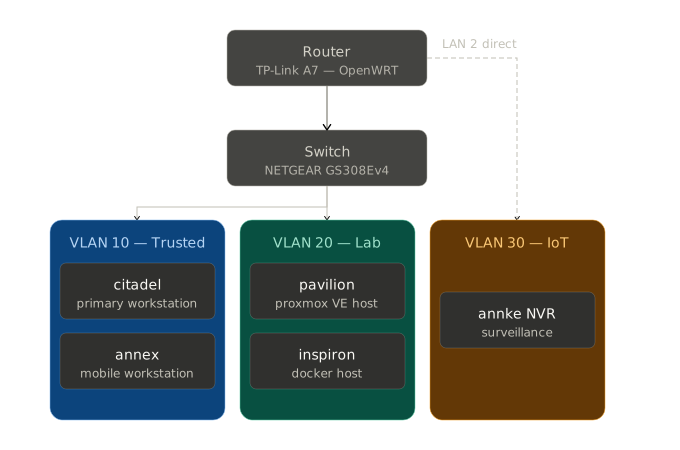 Network Topology Diagram
What’s Next
With the hardware in place and conventions documented, the next step was the most technically involved phase of V2. It was time to migrate the home network from a flat topology to the segmented VLAN architecture using OpenWRT and a managed switch.