Remote Access: Tailscale Subnet Router
Deploying a Tailscale subnet router on Proxmox to expose VLAN 10/20 remotely, and adding Wazuh agents to three more LXC containers.

Overview
With the core infrastructure stable on optiplex, my next challenge was remote access. Accessing lab services from outside my home network wasn’t possible and thus I decided to address this shortcoming. This post covers the evaluation, deployment, and testing of a Tailscale subnet router, a dedicated LXC container that exposes both trusted and lab VLANs to the tailnet, along with adding Wazuh agents to three previously unmonitored LXC containers.
Tailscale Subnet Router
The subnet router runs as a dedicated LXC container on optiplex. Keeping it isolated from other workloads helps modifications would have minimal effects on the rest of the lab.
| Setting | Value |
|---|---|
| CT ID | 400 |
| Hostname | tailscale |
| OS | Debian 13 (Trixie) |
| IP | 192.168.20.XX (VLAN 20) |
| Tailscale IP | XXX.XX.XXX.XXX |
| Advertised routes | 192.168.10.0/24, 192.168.20.0/24 |
VLAN 30 (IoT) is intentionally excluded. No reason to make them remotely accessible at the moment.
Container Requirements
Tailscale requires TUN device access inside the container. The community helper script handles this automatically by configuring the necessary LXC options in /etc/pve/lxc/400.conf:
1
2
3
features: nesting=1,keyctl=1
lxc.cgroup2.devices.allow: c 10:200 rwm
lxc.mount.entry: /dev/net/tun dev/net/tun none bind,create=file
These settings cannot be set on a running container, the helper script applies them before first boot.
Configuration
Subnet Advertisement
With the container running, Tailscale was brought up with both VLAN subnets advertised:
1
tailscale up --advertise-routes=192.168.10.0/24,192.168.20.0/24 --accept-dns=false
The --accept-dns=false flag prevents Tailscale from pushing its MagicDNS configuration to the container’s local resolver. Pi-hole is configured separately as the tailnet’s global nameserver (see DNS section below), accepting Tailscale’s DNS on the subnet router itself would create a conflict.
After running this command, the advertised routes require manual approval in the Tailscale admin console before they become active on the tailnet.
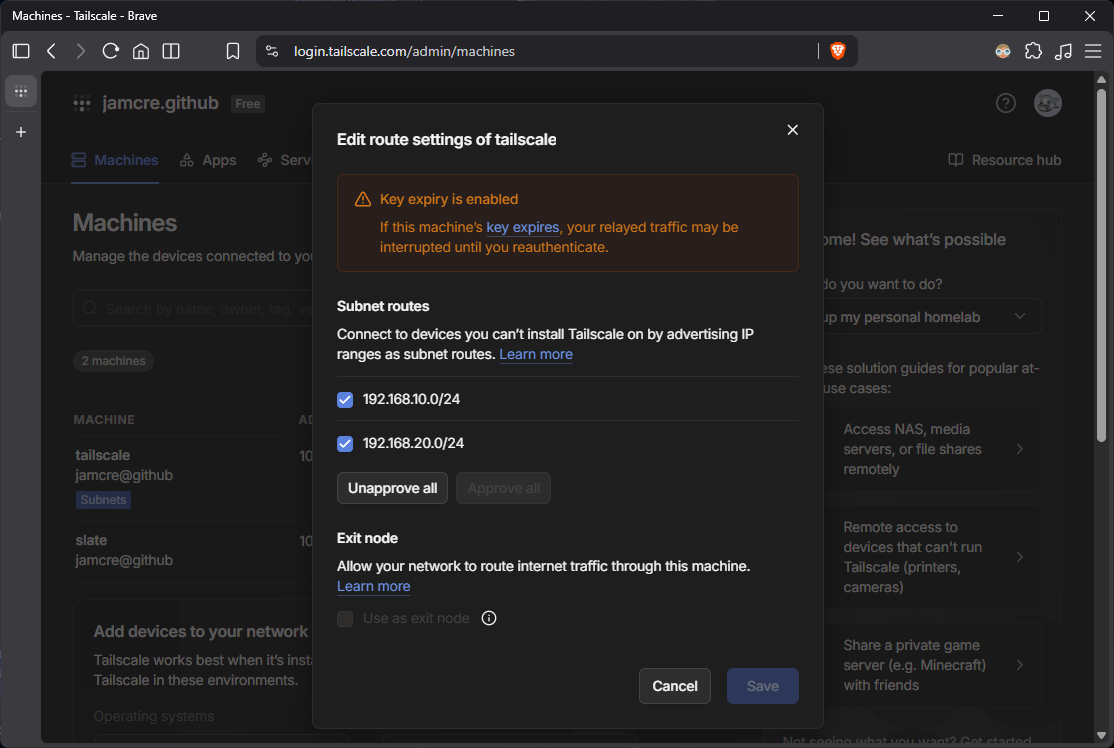 Tailscale admin console showing both subnet routes approved
IP Forwarding
A subnet router must forward packets between the Tailscale interface and the advertised subnets. This requires IP forwarding to be enabled. The standard approach, writing to /proc/sys/net/ipv4/ip_forward or setting values in /etc/sysctl.conf, does not persist across reboots in unprivileged LXC containers. The container shares the host kernel but cannot modify persistent sysctl state.
Attempting to set forwarding via lxc.sysctl entries in /etc/pve/lxc/400.conf was also rejected by Proxmox.
Fix: A systemd drop-in file writes the forwarding values directly to /proc before tailscaled starts on every boot:
File: /etc/systemd/system/tailscaled.service.d/ipforward.conf
1
2
3
[Service]
ExecStartPre=/bin/sh -c 'echo 1 > /proc/sys/net/ipv4/ip_forward'
ExecStartPre=/bin/sh -c 'echo 1 > /proc/sys/net/ipv6/conf/all/forwarding'
The drop-in runs unconditionally before each tailscaled start, including after reboots.
This is the correct approach for unprivileged LXC containers running Tailscale on Proxmox. The sysctl-based methods are documented widely but silently fail in this environment.
UDP GRO Forwarding
Tailscale recommends disabling UDP GRO list processing on the network interface to improve throughput when the container is acting as a subnet router. On most systems this is handled via networkd-dispatcher. Debian 13 does not ship with networkd-dispatcher, so a systemd oneshot service handles it instead.
File: /etc/systemd/system/tailscale-gro.service
1
2
3
4
5
6
7
8
9
10
11
[Unit]
Description=Fix UDP GRO for Tailscale
After=network.target

[Service]
Type=oneshot
ExecStart=/sbin/ethtool -K eth0 rx-udp-gro-forwarding on rx-gro-list off
RemainAfterExit=yes

[Install]
WantedBy=multi-user.target
The service runs once at boot and applies the ethtool settings before the network is in active use.
DNS
Pi-hole (192.168.20.XX) was added as a global nameserver in the Tailscale admin console under the DNS tab, with Override local DNS enabled. This ensures that all tailnet clients, including slate when connecting remotely, resolve DNS through Pi-hole, preserving access to local hostnames and *.jamcre.dev subdomains over the VPN.
Troubleshooting
Issue 1: Routes Not Advertised on First Run
tailscale up was initially run without the --advertise-routes flag. The connection came up but no subnets were visible in the admin console.
Fix: Re-ran with the correct flag:
1
tailscale up --advertise-routes=192.168.10.0/24,192.168.20.0/24 --accept-dns=false
Confirmed via:
1
tailscale debug prefs | grep AdvertiseRoutes
Issue 2: Routes in Prefs But Not in Routing Table
After admin console approval, AdvertiseRoutes showed both subnets correctly in tailscale debug prefs. However, checking the Tailscale routing table showed they were not active:
1
ip route show table 52
The daemon was holding a stale network map from before the approval. The routes existed in local config but had not been refreshed from the control plane.
Fix: Cycle the connection to force a fresh netmap pull:
1
tailscale down && tailscale up --advertise-routes=192.168.10.0/24,192.168.20.0/24 --accept-dns=false
After reconnecting, ip route show table 52 listed both subnets correctly.
If subnet routes are approved in the admin console but traffic is not routing, check
ip route show table 52inside the container. An empty result with correct prefs indicates a stale netmap — cycling the connection resolves it.
Issue 3: Wazuh Agent Installation (Recurring)
Two issues from the V2 Wazuh deployment recurred on CT 400: the lsb-release dependency missing on minimal Debian containers, and the MANAGER_IP placeholder not replaced in ossec.conf. Both are documented in detail in the V2 Wazuh post. The fixes are identical, install lsb-release before running the Wazuh repo setup commands, and manually edit ossec.conf to replace the placeholder with 192.168.20.XX.
Validation
slate was taken off the home network entirely, connected to an iPhone mobile hotspot, and used to validate full subnet access through the tailnet.
1
2
3
4
5
6
7
8
9
10
11
12
# Reachability to Pi-hole
ping 192.168.20.XX
# 23 packets transmitted, 23 received, 0% packet loss, avg 86ms

# Reachability to Wazuh
ping 192.168.20.XX
# 3 packets transmitted, 3 received, 0% packet loss, avg 79ms

# Service access via NPM
curl -IL https://homarr.jamcre.dev
# HTTP/1.1 301 Moved Permanently  (NPM HTTPS redirect)
# HTTP/2 200                       (Homarr loaded)
Both advertised subnets were reachable. NPM-routed services resolved correctly through Pi-hole and returned valid responses. The tailnet showed an active direct connection to the subnet router:
1
2
tailscale status
# XXX.XX.XXX.XX  slate  jamcre@  macOS  active; direct 192.168.20.XX:XXXXX, ...
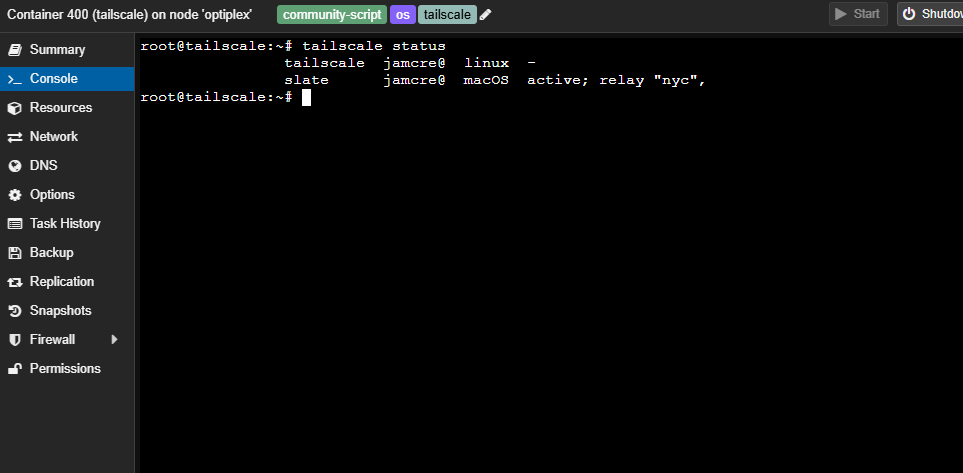
tailscale status on CT 400 showing slate connected via direct path
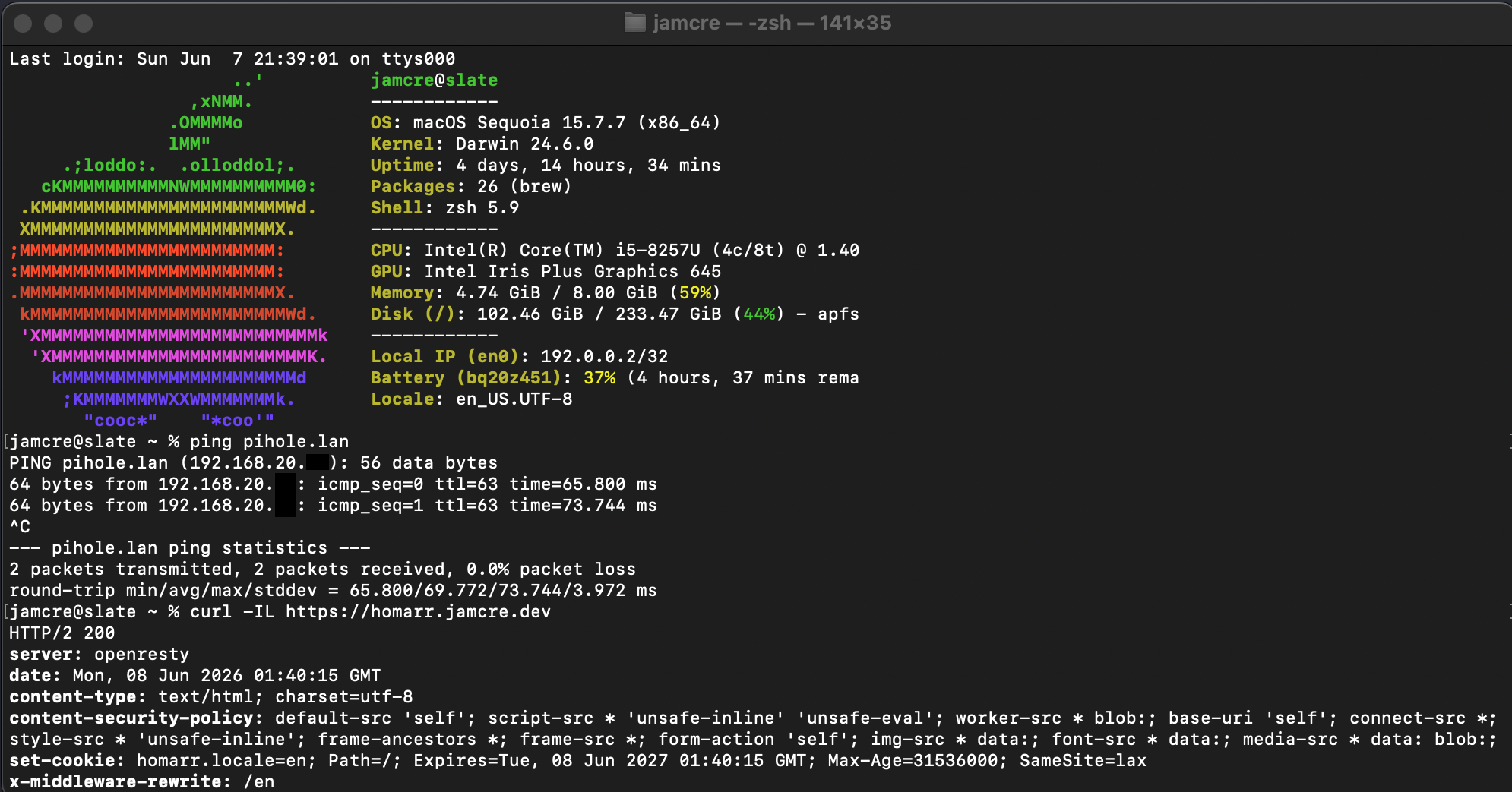 Ping and curl results from slate on mobile hotspot — no home network
Wazuh Agent Expansion
With Tailscale operational, the Wazuh deployment was extended to three LXC containers that had been running without agents since V2. Until now, monitoring was limited to the four physical machines enrolled in V2. The core infrastructure containers, Pi-hole, NPM, and the new Tailscale router, had no endpoint coverage.
| Agent | Hostname | CT ID | IP | OS |
|---|---|---|---|---|
| 5 | tailscale | 400 | 192.168.20.XX | Debian 13 |
| 6 | pihole | 100 | 192.168.20.XX | Debian 13 |
| 7 | nginx | 101 | 192.168.20.XX | Debian 12 |
Each container was enrolled using the same process: open the LXC shell, install lsb-release, run the Wazuh-generated DEB install block from the Deploy new agent UI with the manager address set to 192.168.20.XX, then enable and start the agent service:
1
2
systemctl enable wazuh-agent
systemctl start wazuh-agent
All three appeared active in the Wazuh dashboard after a short sync delay. The total enrolled agent count is now 7.
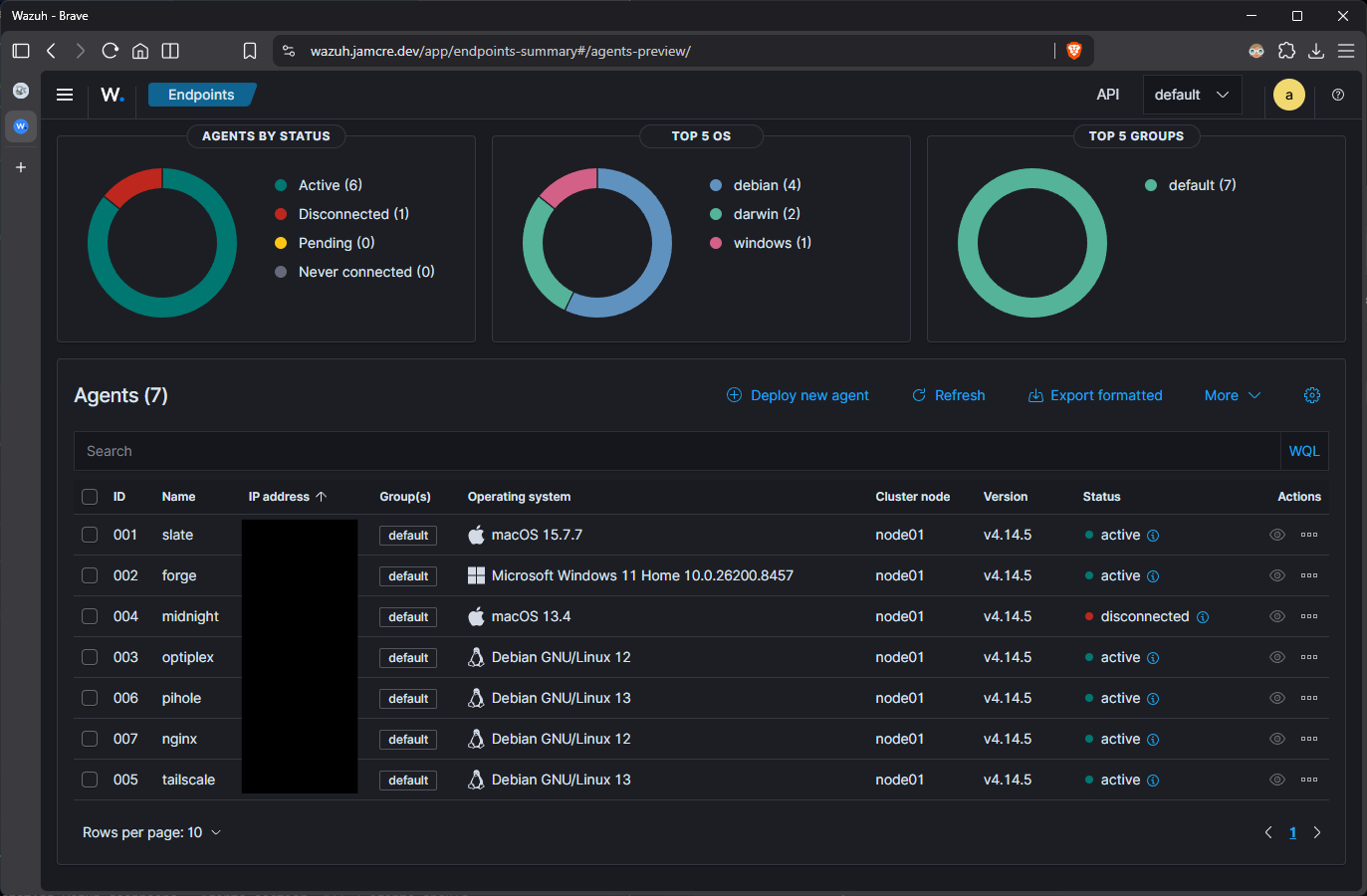 Wazuh dashboard showing all 7 agents active and reporting
A ping monitor for CT 400 (192.168.20.XX) was also added to Uptime Kuma at a 60-second interval, consistent with the monitoring pattern established for other lab services.
What’s Next
Remote access is working. The monitoring stack now covers both physical machines and core infrastructure containers. The lab is in a more complete operational state than it has been at any point across V1, V2, or V3.