Custom Detection Rules: Writing, Testing, & Validating
Writing, testing, and validating four custom Wazuh detection rules covering SSH brute force, Windows logon spikes, and unauthorized privilege escalation.

Overview
With Wazuh running and all agents enrolled, the next step was building custom detection logic tailored to this environment. Wazuh ships with hundreds of built-in rules, but a core SOC skill is writing detections specific to your infrastructure: understanding which base rules fire, chaining events for correlation, and validating that alerts trigger reliably before trusting them in production.
This post covers four custom rules, written, tested, and verified against live attack simulations on the lab machines.
Rule Architecture: Essential Concepts
Before writing any detection rule, three concepts must be understood correctly. Getting these wrong produces rules that appear syntactically valid but silently never fire.
1. if_sid vs if_matched_sid
| Directive | Behavior | Use Case |
|---|---|---|
if_sid | Fires when a single event matches the parent rule | Immediately suspicious activity (e.g., unauthorized sudo) |
if_matched_sid | Fires when a parent rule matches N times within a time window | Correlation-based detection (e.g., brute force) |
A single failed login is normal. Thirty failed logins from the same IP in sixty seconds is not, that requires if_matched_sid with frequency correlation.
2. frequency and timeframe Are Attributes, Not Elements
A common XML mistake:
1
2
3
4
5
<!-- WRONG — loads without error but never fires at threshold -->
<rule id="100001" level="10">
  <frequency>5</frequency>
  <timeframe>60</timeframe>
</rule>
Correct placement, as attributes on the <rule> tag:
1
2
3
<!-- CORRECT -->
<rule id="100001" level="10" frequency="5" timeframe="60">
</rule>
The incorrect version produces no error. The rule loads but the threshold logic never activates. This is a silent failure with no indication in logs.
3. same_srcip vs same_field (Windows Events)
same_srcip groups frequency counts by source IP, it works correctly for Linux events where decoders populate the standard srcip field.
For Windows events, the attacker IP is stored in win.eventdata.ipAddress, a dynamic decoded field. The standard srcip field is empty. A Windows correlation rule using same_srcip will never reach its frequency threshold because no two events share the same empty value.
Solution: Use same_field with the correct decoded field name:
1
<same_field>win.eventdata.ipAddress</same_field>
This is the most non-obvious failure mode in Wazuh rule writing. The rule loads, events arrive, and nothing fires. The only way to catch it is knowing this specific behavior exists.
Verifying Base Rule IDs
Before writing correlation rules, the actual base rule ID firing for each event type was verified in the live environment. Documentation lists expected IDs, but the actual firing rule depends on Wazuh version and agent OS.
Method: Generated test events → observed alerts in Wazuh dashboard → noted the actual rule.id on each alert.
| Event Type | Expected SID | Actual SID | Delta |
|---|---|---|---|
| SSH invalid user | 5710 | 5710 | Match |
| SSH auth failure | 5716 | 5760 | Different |
| Linux sudo failure | 5401 | 5405 | Different |
| Windows Event ID 4625 | 60122 | 60122 | Match |
Two of four expected base rule IDs were wrong. A correlation rule written against the wrong parent ID produces no error and never fires. Always verify in your specific environment.
The Detection Rules
All rules reside in /var/ossec/etc/rules/local_rules.xml on the Wazuh manager. Custom rule IDs use the 100000–999999 range to avoid conflicts with built-in rules.
| Rule ID | Description | Level | Type |
|---|---|---|---|
| 100001 | SSH brute force — invalid user | 10 | Correlation (5+ events/60s) |
| 100002 | SSH auth failure spike | 12 | Correlation (5+ events/60s) |
| 100003 | Linux unauthorized sudo attempt | 12 | Single-event |
| 100004 | Windows failed logon spike | 10 | Correlation (5+ events/60s) |
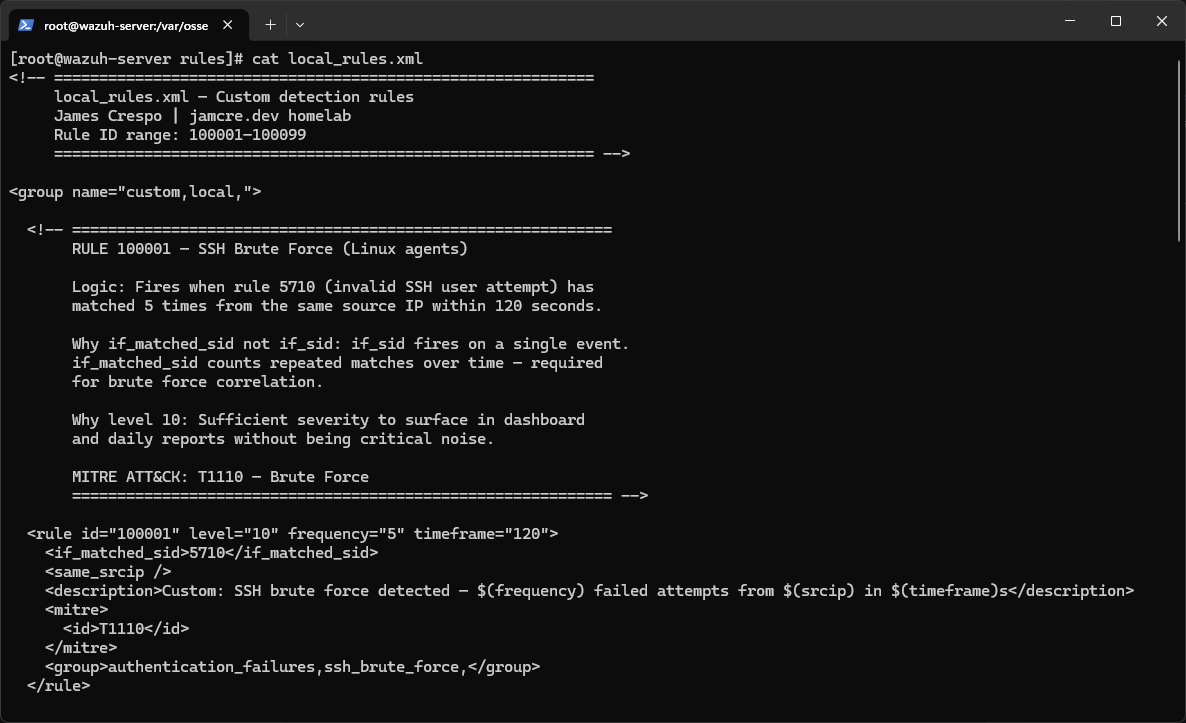 Custom rules deployed in local_rules.xml on the Wazuh manager
Rule Design Decisions
- Rules 100001/100002 separate the two SSH failure paths (invalid user vs. wrong password for existing user) because they fire different base rules and represent different attacker behaviors
- Rule 100003 has no frequency threshold — a single unauthorized sudo attempt is immediately suspicious and warrants an alert
- Rule 100004 uses
same_fieldinstead ofsame_srcipto correctly correlate Windows events by attacker IP
Validation Process
Syntax Verification
wazuh-logtest was used to validate rule matching logic interactively before restarting the manager. Sample SSH failure logs were pasted, and the firedtimes counter was observed incrementing. On the fifth paste, the correlation rule fired as expected.
After saving rule changes, restart the manager:
1
systemctl restart wazuh-manager
Attack Simulations
Each rule was tested with a targeted simulation designed to reliably trigger its specific detection path.
Rules 100001 & 100002 — SSH Brute Force
Failed SSH logins generated from citadel targeting pavilion:
1
2
3
4
5
# Rule 100001 — invalid user path (triggers base rule 5710)
for ($i=1; $i -le 6; $i++) {
    ssh fakeuser@192.168.20.XX 2>$null
    Start-Sleep -Milliseconds 500
}
For Rule 100002, a test user was created on the target with a known password, then rapid failures were generated against that existing account to trigger the auth failure path (rule 5760).
Rule 100003 — Unauthorized Sudo
A non-privileged test user attempted a privileged command:
1
sudo cat /etc/shadow
The PAM subsystem logged the unauthorized attempt, Wazuh decoded it via base rule 5405, and custom rule 100003 fired on the single event.
Rule 100004 — Windows Failed Logon Spike
net use was used to generate network logon failures, which reliably populates win.eventdata.ipAddress in Event ID 4625:
1
2
3
4
for ($i=1; $i -le 6; $i++) {
    net use \\192.168.20.XX\ipc$ /user:fakeuser wrongpassword 2>$null
    Start-Sleep -Milliseconds 500
}
The
net usemethod is recommended overStart-Processor GUI-based credential prompts, which are unreliable for populatingwin.eventdata.ipAddress.
Results
All four rules fired successfully and were confirmed in the Wazuh dashboard:
| Rule ID | Description | Alert Level | Result |
|---|---|---|---|
| 100001 | SSH brute force — invalid user | 10 | ✅ Fired and confirmed |
| 100002 | SSH auth failure spike | 12 | ✅ Fired and confirmed |
| 100003 | Linux unauthorized sudo | 12 | ✅ Fired and confirmed |
| 100004 | Windows failed logon spike | 10 | ✅ Fired and confirmed |
Key Lessons Learned
| Lesson | Impact |
|---|---|
| Verify base rule IDs in your environment | 2 of 4 expected IDs were wrong — silent correlation failure |
same_srcip fails for Windows events | Use same_field with the correct decoded field name |
frequency/timeframe are rule attributes | Wrong placement = no error + threshold never activates |
| Single-event rules don’t need frequency | One unauthorized sudo attempt is already suspicious |
| Test both SSH failure paths separately | Invalid user (5710) and wrong password (5760) are distinct detection paths |
What’s Next
V2 went from a flat network with no visibility to a three-VLAN segmented architecture with centralized DNS, HTTPS service routing, and a SIEM running custom detection rules validated against live attack simulations.
The natural next steps were expanded detection coverage, remote access via WireGuard/Tailscale, and additional services on inspiron. Plans that were ultimately redirected by a hardware upgrade that made a V3 rebuild the better path forward.