Nginx Proxy Manager: SSL & Service Routing
Deploying Nginx Proxy Manager with a wildcard SSL certificate via Cloudflare DNS challenge.

Overview
With Pi-hole resolving all lab subdomains to a single IP address, the next component was something to sit at that IP and intelligently route requests to the correct backend service. That component is Nginx Proxy Manager (NPM), a reverse proxy with a web UI that handles SSL termination, automatic certificate renewal, and hostname-based routing.
This post covers the NPM deployment, wildcard SSL certificate generation via Cloudflare DNS challenge, and proxy host configuration for every lab service.
What a Reverse Proxy Does
Without a reverse proxy, accessing a service means remembering specific IP and port combinations: https://192.168.20.XX:8006 for Proxmox, http://192.168.20.XX:80 for Pi-hole, and so on. This approach has two significant problems:
- Usability: IP:PORT combinations are difficult to remember and share
- Security: there is no clean mechanism to deploy valid SSL certificates on each individual service
A reverse proxy solves both. It accepts requests by hostname, matches them to configured backends, and forwards traffic transparently. The client only communicates with NPM; backend IPs and ports remain internal.
The SSL certificate lives on NPM, one certificate, one renewal process, all services covered.
[PLACEHOLDER: Diagram showing client request flow: Browser → DNS (Pi-hole) → NPM → Backend Service, with SSL termination happening at the NPM layer] 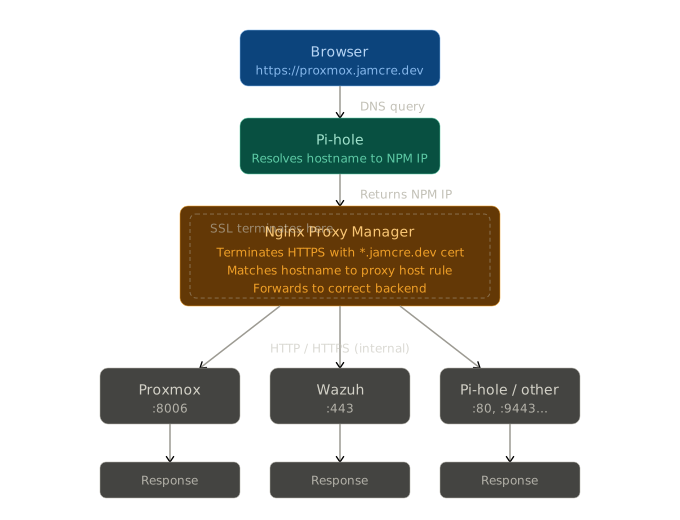 NPM Client Request Diagram
Deployment
NPM runs as an LXC container on pavilion, installed via the Proxmox VE Helper Scripts.
| Setting | Value |
|---|---|
| CT ID | 101 |
| Base Image | Debian (via helper script) |
| VLAN | 20 — Lab |
| IP | 192.168.20.XX/24 |
| DNS | Pi-hole |
After installation, the NPM admin panel is accessible at http://192.168.20.XX:81.
Wildcard SSL Certificate
Rather than generating individual certificates per service, a single wildcard certificate covers every subdomain under *.jamcre.dev, one cert, automatic renewal, zero per-service configuration.
How It Works
Let’s Encrypt issues wildcard certificates exclusively via DNS challenge, which proves domain ownership by creating a DNS TXT record. Since Cloudflare manages the jamcre.dev domain, NPM’s built-in Cloudflare integration handles this automatically.
Configuration Steps
1. Create a Cloudflare API Token
In the Cloudflare dashboard, create an API token with Edit Zone DNS permissions scoped to jamcre.dev. This is the minimum permission required.
Do not use the global API key. A scoped token follows the principle of least privilege.
2. Request the Certificate in NPM
Navigate to SSL Certificates → Add SSL Certificate → Let’s Encrypt:
| Field | Value |
|---|---|
| Domain | *.jamcre.dev |
| DNS Provider | Cloudflare |
| Credentials | dns_cloudflare_api_token=<token> |
| Propagation seconds | 0 |
3. Fix the Admin Email (Critical)
The NPM helper script sets the default admin email to [email protected]. Let’s Encrypt rejects this address during account registration, causing the certificate request to fail silently.
Update the NPM admin account email to a valid address before requesting the certificate.
Once issued, NPM renews the certificate automatically before expiry with no manual intervention.
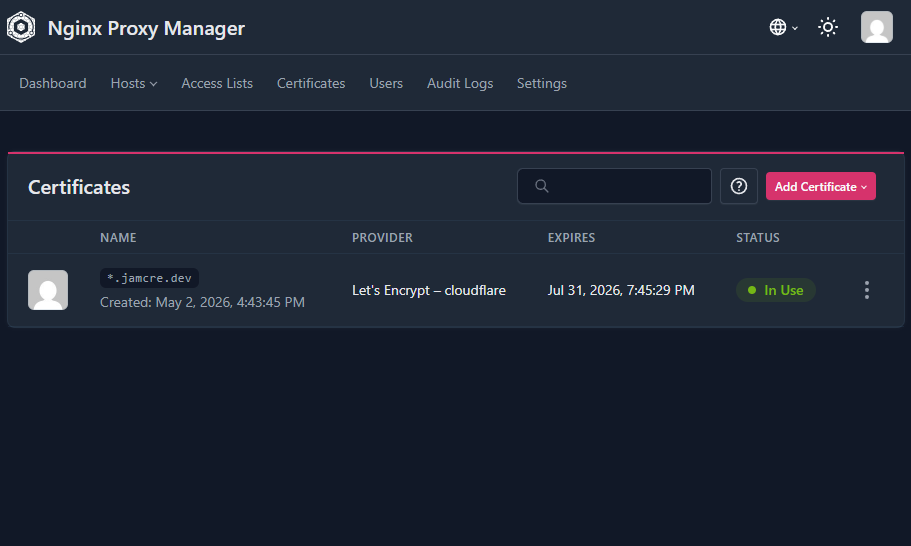 Wildcard certificate for *.jamcre.dev issued and active
Proxy Host Configuration
With the certificate in place, each service receives a proxy host entry. All hosts have Force SSL, HSTS, and HTTP/2 enabled.
| Source | Backend | Notes |
|---|---|---|
proxmox.jamcre.dev | https://192.168.20.XX:8006 | WebSockets enabled |
pihole.jamcre.dev | http://192.168.20.XX:80 | — |
nginx.jamcre.dev | http://192.168.20.XX:81 | NPM proxying itself |
wazuh.jamcre.dev | https://192.168.20.XX:443 | proxy_ssl_verify off, WebSockets |
Notable Configurations
Wazuh — uses proxy_ssl_verify off because its backend serves a self-signed certificate that NPM cannot verify. The client-to-NPM connection remains fully encrypted via the wildcard cert.
NPM proxying itself — nginx.jamcre.dev routes to NPM’s own admin port. This sounds circular but functions correctly, providing a clean HTTPS URL for the admin panel.
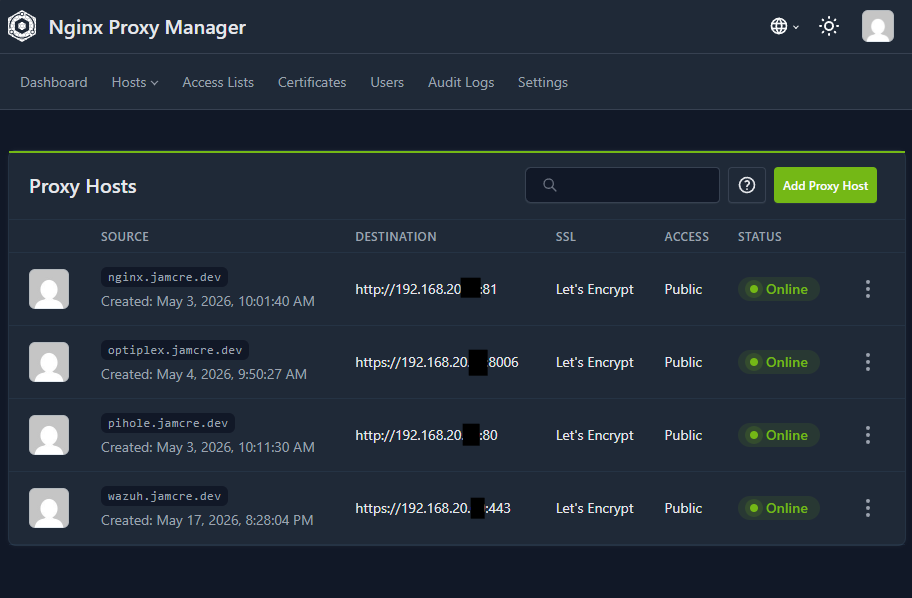 All proxy hosts configured and active in NPM
What’s Next
Every lab service now has a clean HTTPS hostname accessible from VLAN 10/20. The wildcard certificate handles all subdomains automatically. The infrastructure layer of V2 is complete.
Next: Wazuh SIEM, the service I’ve been looking forward to deploying.